

Quick question: if the power, the internet and the card readers all went down in your town tonight, what would your household do first?
If your honest answer is “look for a flashlight and hope the phone battery holds,” you’ve got plenty of company. Most of us have built our lives around systems that work so reliably we’ve stopped thinking of them as systems at all. Flip a switch, tap a card, turn a faucet. Done.
Then a day like Friday, November 13, 2026 comes along. A telecommunications failure at the FAA’s regional control centers forced a nationwide ground stop that held every departing U.S. flight for more than four hours, and officials blamed aging, overloaded equipment, not hackers. (If you want the full breakdown of how ground stops work and what happened to travelers, read our companion post, FAA Ground Stop Explained: What It Means for Your Household.)
This article isn’t about airplanes. It’s about your kitchen, your garage, your wallet and your family group chat. If one of the most closely watched technology systems in the country can go dark everywhere at once, the smaller systems your house depends on (your local water utility, the payment processor behind your grocery store, the pharmacy software that fills your prescriptions, the cell tower down the road running on a few hours of battery) can certainly go dark too. Sometimes because of age. Sometimes because of weather. Sometimes because somebody on the other side of the world wanted them to.
You can’t fix the nation’s infrastructure. You can make sure your household doesn’t fall apart when a piece of it fails. That’s what this guide covers: a calm, practical plan for keeping your family fed, informed, connected and un-scammed for a few hours, a few days, or longer.
Grab a coffee. (Brew it now, while the coffee maker still works. Kidding. Mostly.)
The short version (if you only read one box)
- Outages don’t need a villain. Old equipment, bad software updates and weather cause more of them than hackers do.
- Deliberate attacks are rising too, and cheap AI tools have lowered the skill needed to pull them off.
- One failure triggers others. Power affects water, payments, fuel, phones and medicine, usually in that order.
- Your best defenses are boring and cheap: water, food, cash in small bills, paper copies of key information, a battery or crank radio, backup power, and a family plan that works without a cell signal.
- Scams explode during outages. Decide now that you’ll never act on an urgent call, text or email without verifying it yourself.
Why Does Modern Convenience Come With a Catch?
Think about how you bought gas, groceries and coffee this week. Odds are you tapped a card or a phone. You probably didn’t carry much cash. Your thermostat may be connected to Wi-Fi. Your doorbell, your garage door, your car and maybe even your refrigerator talk to the internet. Your family’s photos, tax returns and medical records live “in the cloud.” Your kids’ school sends alerts by app.
None of that is bad. Honestly, most of it is wonderful. (I will fight anyone who wants to bring back paper road maps as the only option. Keep one in the truck, though. More on that later.)
The catch is this: every convenience is a dependency. Each one quietly assumes that power is on, the internet is up, the cell network is working, the payment processor is online, and the company behind the app hasn’t been hacked or gone out of business.
Fifty years ago, a household could ride out a three-day power outage with a pantry, a transistor radio, some cash in a coffee can and a neighbor down the road. Today, many households would lose their ability to buy anything, communicate with family, open the garage, access medical records and even find out what’s going on, all within a few hours.
We’ve traded resilience for convenience without really noticing. The goal isn’t to give the conveniences back. It’s to add a few low-tech backups so that the conveniences are a bonus, not a single point of failure.
How Old Is the Infrastructure We Depend On?
Here’s an uncomfortable truth: a lot of the machinery behind modern life was designed for a world that no longer exists.
Large parts of the U.S. power grid were built in the decades after World War II. Many water systems run on pipes and control equipment installed long before anyone imagined connecting them to the internet. Air traffic control, as we all just learned, still relies on equipment that the Transportation Secretary himself described as decades old and analog. Congress approved $12.5 billion over five years to upgrade it last year, and on Friday, Duffy called for $50 billion more.
Aging infrastructure creates two problems at once:
- It breaks more often. Old transformers fail in heat waves. Old pipes burst in freezes. Old routers choke when new technology pushes more data through them than they were built to handle (which is roughly what happened on November 13).
- It’s harder to protect. Many older control systems were designed to be isolated, so security wasn’t a priority. Then, over the years, they got connected to office networks and the internet for convenience (there’s that word again), often without the protections modern systems have. Some can’t be easily patched or replaced without shutting down service.
If you live in Texas like I do, you don’t need a lecture on this. The February 2021 winter storm knocked out power to millions of homes, and the failures cascaded into water outages and boil-water notices across the state. Nobody hacked anything. The system just wasn’t built for that week.
The lesson isn’t “the grid is doomed.” The grid works astonishingly well most of the time. The lesson is that “most of the time” isn’t “all of the time,” and the gaps are getting more frequent.
Who Disrupts Systems on Purpose, and Why?
Not every outage is an accident. A growing number are deliberate. The people behind them fall into a few broad groups:
1. Criminal ransomware gangs
These groups break into a company’s network, lock up its data, and demand payment to unlock it. They don’t usually care about causing chaos; they care about getting paid. But chaos is a side effect. In May 2021, a ransomware attack on Colonial Pipeline led the company to shut down the pipeline that carries a huge share of the fuel used on the East Coast, and drivers across the Southeast lined up at empty gas stations for days. In early 2024, a ransomware attack on Change Healthcare, a company most people had never heard of, disrupted prescription processing and payments at pharmacies and doctors’ offices across the country for weeks.
Notice the pattern: the target was a company in the middle, one that consumers never deal with directly. That’s what makes these attacks so disruptive. You can’t plan around a company you don’t know exists.
2. Foreign government hackers
U.S. agencies have publicly warned for years that state-sponsored groups are quietly getting inside American infrastructure. In 2024, CISA and its partners warned that a Chinese state-sponsored group known as Volt Typhoon had pre-positioned itself inside U.S. critical infrastructure networks, including communications, energy, water and transportation, potentially to cause disruption during a future conflict. In late 2023, hackers linked to Iran’s government defaced industrial control devices at water facilities in the U.S., including a water authority in Aliquippa, Pennsylvania.
These groups play a long game. They’re not trying to steal your credit card. They’re mapping out what they could turn off later.
3. Hacktivists and opportunists
Some attackers want attention for a political cause. Others are just poking around for something unprotected. Small utilities and local governments, with small IT budgets, are frequent victims.
4. Scammers who feed on the chaos
This last group doesn’t cause outages. They exploit them. Every major disruption brings a wave of fake rebooking texts, fake refund calls, fake utility shutoff notices and fake charities. We’ll cover how to spot them in detail below, because statistically, this is the group most likely to actually take money out of your pocket.
How Has AI Made Cyberattacks Easier to Pull Off?
This is the part of the story that’s genuinely new, and it’s worth understanding without the hype.
Historically, attacking an industrial system like a water plant required specialized knowledge. You needed to understand the equipment, the software it ran, the network it sat on and how to get from the office computers to the machinery. That expertise was rare, which kept the pool of capable attackers small.
AI tools are shrinking that barrier.
In 2026, the industrial cybersecurity firm Dragos published an investigation into an intrusion at a municipal water and drainage utility in the Monterrey area of Mexico, part of a broader campaign against Mexican government organizations between December 2025 and February 2026. The attackers leaned heavily on commercial AI chatbots (reports named models from both OpenAI and Anthropic) to write scripts, map the network and identify the systems connected to the utility’s physical operations. The attackers ultimately failed to break into the operational systems that actually run the water infrastructure. But Dragos warned that commercial AI had lowered the barrier to entry for attacks on critical infrastructure, compressing work that once took weeks of expert effort into hours.
Dragos was also careful to point out that this wasn’t an AI going rogue. Humans were in control the whole time. The shift is about accessibility: people with modest skills can now attempt things that used to require an expert team.
And in August 2026, U.S. officials warned that hackers were actively using an AI-generated exploitation script against a type of device commonly found in critical infrastructure, one that had played a key role in a wave of attacks on U.S. water systems.
AI is also supercharging the scams that hit regular families. The FBI’s Internet Crime Complaint Center (IC3) reported a record $20.877 billion in losses in 2025 across more than one million complaints, the first year it ever crossed that mark. For the first time, the FBI tracked AI as its own category: about 22,000 complaints involving AI, with roughly $893 million in losses. Americans 60 and older were hit hardest, reporting $7.7 billion stolen.
What does AI do for scammers? It writes flawless, personalized phishing emails (goodbye, obvious typos). It clones voices from a few seconds of social media video. It generates fake websites that look exactly like your airline, your bank or your utility company. And it does all of that at scale, for pennies.
Put it together and you get the honest picture: the systems are old, the attackers are more numerous, and the tools they use are getting cheaper and better. None of that means disaster is around the corner. It means preparation has gone from “nice idea” to “basic household maintenance,” like smoke detectors and a fire extinguisher.
What Kinds of Outages Have Nothing to Do With Hackers?
Here’s something the doom-scrolling crowd tends to miss: most big outages aren’t caused by hackers at all. The ground stop we just lived through is Exhibit A. A few more examples worth remembering:
- The CrowdStrike outage (July 2024). A faulty software update from a cybersecurity company crashed roughly 8.5 million Windows computers worldwide. Airlines grounded flights, hospitals postponed procedures, 911 centers had problems and store registers went dark. No attacker involved; just one bad file pushed to millions of machines.
- The 2003 Northeast blackout. A software bug in an alarm system at an Ohio utility helped turn a few sagging power lines into a blackout that left about 50 million people in the U.S. and Canada without power.
- The 2023 FAA NOTAM failure. An accidentally deleted file halted domestic departures nationwide.
- Hurricanes, ice storms, wildfires, heat waves and floods remain the most common reason households lose power, water and communications.
- Plain old mistakes. A backhoe cuts a fiber line. A configuration change goes wrong at a cell carrier. A data center loses cooling.
Why does this matter for your plan? Because it doesn’t matter why the lights went out. Whether it was a ransomware gang, a foreign government, a solar storm, a software bug or a squirrel in a substation (yes, that’s a real and surprisingly common cause), your kitchen faucet, your card reader and your cell phone react the same way.
That’s the beauty of this approach: you don’t have to predict the cause. You prepare for the effect.
What Fails After One System Goes Down? (The Chain Reaction)
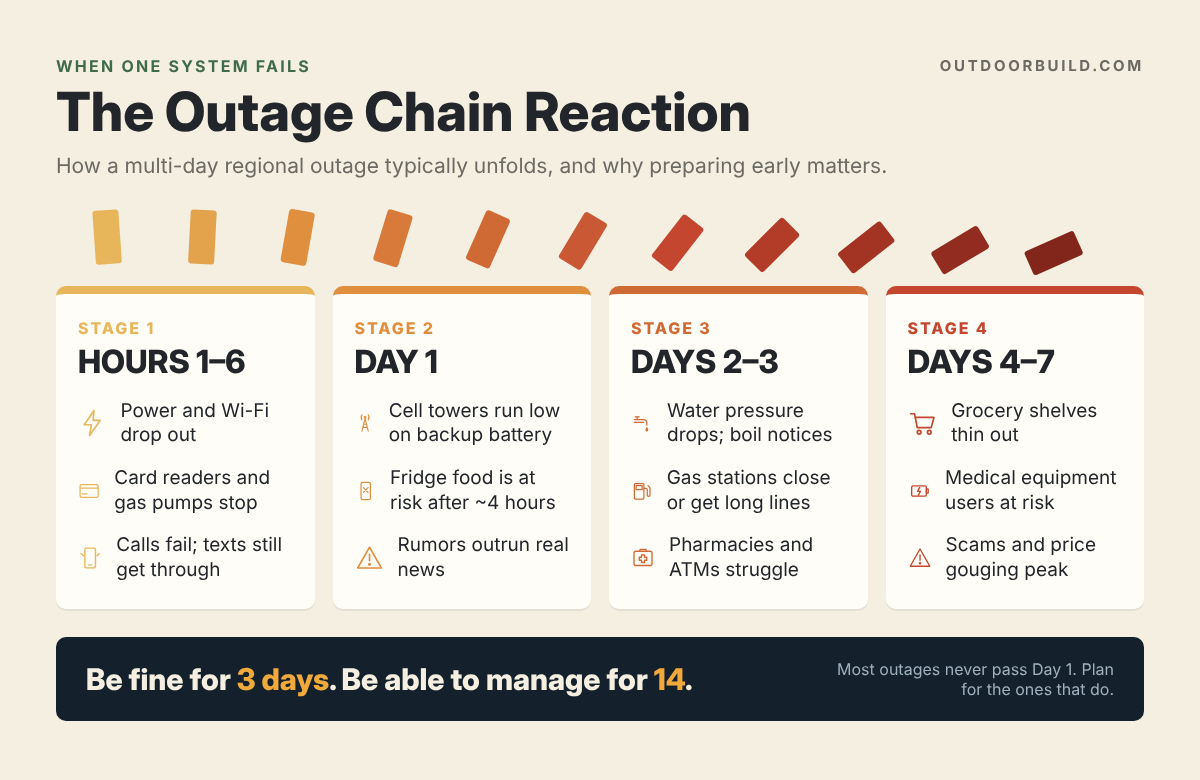
Modern systems are linked like dominoes. When one falls, it rarely falls alone. Here’s a realistic picture of how a multi-day regional power and network outage tends to unfold. It isn’t a prediction. It’s a planning tool.
Hour 1 to 6
- Power is out. Wi-Fi is down. Your phone works, but it’s on battery.
- Card readers at stores and gas pumps stop working unless the business has backup power and a working connection. Many stores close or go cash-only.
- Traffic lights fail. Garage doors without a manual release trap cars.
- People flood the cell network with calls, so calls fail even if towers are up. Texts usually get through better.
Day 1
- Many cell towers rely on backup batteries that last hours, not days. Some have generators; many don’t. Coverage gets spotty.
- Refrigerated food starts to become a concern. A closed fridge typically keeps food safe for about four hours; a full freezer for about 48.
- Rumors spread faster than facts, especially on social media.
Day 2 to 3
- Water utilities need electricity to pump and treat water. Without enough backup power, water pressure can drop and boil-water notices appear.
- Gas stations that can’t pump without electricity stay closed. The ones that are open get long lines.
- Pharmacies may struggle to fill prescriptions if their systems are down.
- ATMs run out of cash or go offline.
Day 4 to 7
- Grocery store shelves thin out as deliveries slow down.
- People who rely on powered medical equipment, refrigerated medications or home oxygen face serious risks.
- Scams peak: fake relief programs, price gouging, fake contractors and fraudulent “account verification” calls.
Most outages never get past Day 1. Some get to Day 3. A few go longer. Your goal is simple: be the household that’s fine through Day 3 without breaking a sweat, and okay through Day 14. FEMA’s Ready.gov recommends having enough supplies for several days at minimum, and many emergency managers now suggest planning for up to two weeks.
How Do You Find Trustworthy News During an Outage?
When the internet is spotty and everyone’s scared, misinformation spreads like a grass fire. “It’s a cyberattack from [insert country]!” “The banks are closing for a month!” “They’re shutting off the water tomorrow!” Most of it is wrong, and some of it is deliberately planted by scammers.
Here’s how to stay informed without getting played:
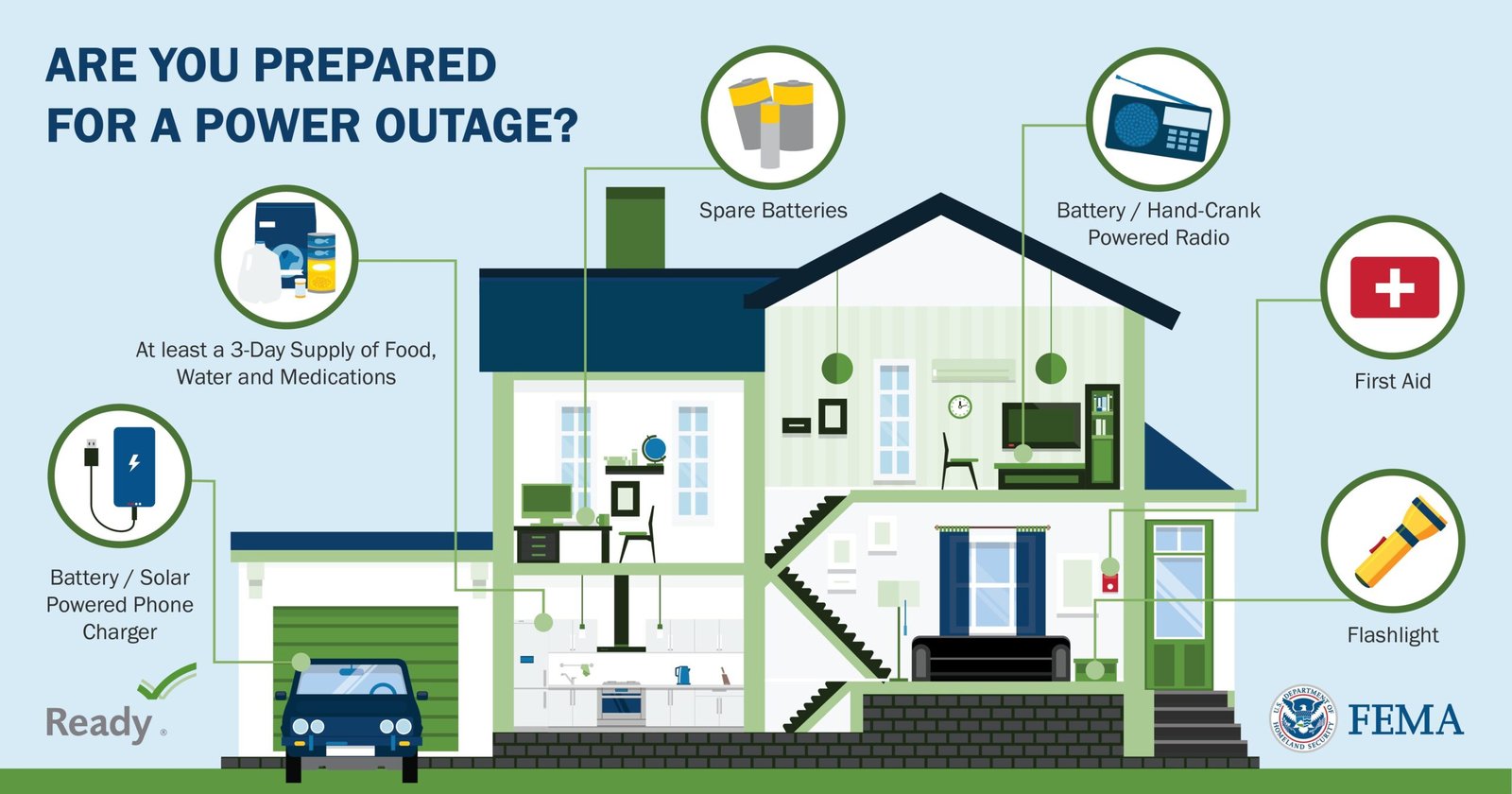
- Own a battery-powered or hand-crank emergency radio. AM and FM broadcast stations often keep transmitting on generator power when the internet is down. A radio that also receives NOAA Weather Radio is even better, since those broadcasts carry official emergency alerts.
- Know your official sources in advance. Write down the names of your local emergency management office, your county or city, your utility companies and your state’s emergency agency. Follow their official accounts now, while things are calm, so you can recognize the real ones later.
- Leave Wireless Emergency Alerts turned on in your phone settings. These are government alerts pushed to phones in a geographic area.
- Use the “two-source rule.” Before you act on or share anything big, confirm it with two independent, official or established news sources.
- Be extra skeptical of screenshots, unsourced claims and anything that urges you to act right now. Urgency is a scammer’s favorite tool.
- Save battery for information. Lower your screen brightness, close apps and turn on low-power mode early instead of late.
🛒 Gear for staying informed
- Hand-crank NOAA weather radio with phone charger: look for AM/FM/NOAA bands, a built-in flashlight, solar and crank charging, and a USB port. Midland and Eton both make popular models.
- High-capacity USB power bank (20,000 mAh or more): enough to recharge most phones several times. Keep it topped off.
- Car charger for phones: your vehicle is a generator on wheels (just never run it in a closed garage).
Why Do You Need Cash on Hand and a Paper Copy of Your Life?
When payment systems go down, cash is king again, at least for a few days. When your phone dies or your cloud account is locked, a paper copy of your important information is the only copy you can actually reach.
The cash part
- Keep some cash at home in small bills: ones, fives, tens and twenties. Stores running on backup systems often can’t make change for a hundred. How much is up to you; a common starting point is enough to cover a few days to a week of essentials like food, fuel and medicine.
- Store it somewhere secure and private, like a fire-resistant safe or document bag. Don’t announce it on social media (yes, people do that).
- Keep a little in your vehicle for fuel and tolls.
- Rotate it occasionally so you don’t forget it exists, and replace whatever you spend.
The paper part: your “life binder”
Put the following in a binder or folder, store it in a fire- and water-resistant pouch, and consider keeping a second copy with a trusted relative outside your area:
- A printed list of family phone numbers, including at least one out-of-state contact. (Quick test: how many phone numbers do you actually know by heart? If the answer is “mine, sort of,” you’re normal, and you need this list.)
- Copies of IDs, Social Security cards, passports, and birth and marriage certificates.
- Insurance policies (home, auto, health, life) with policy numbers and claim phone numbers.
- A list of prescriptions with dosages, prescribing doctors and pharmacy numbers.
- Bank and credit card customer service numbers (not your PINs or passwords).
- Utility account numbers and outage reporting numbers.
- Your family emergency plan (we’ll build it below).
- A paper map of your area and state with a couple of routes out of town marked.
- Veterinary records if you have pets.
Is this old-fashioned? Absolutely. So is a spare tire, and nobody complains about that when they’ve got a flat.
🛒 Protect your cash and documents
- Fireproof and waterproof document bag: an inexpensive way to protect your life binder and emergency cash.
- Fire-resistant home safe: for originals, cash and backup drives.
- Encrypted USB flash drive: a password-protected digital backup of your scanned documents and family photos.
- Paper road atlas: for when GPS and map apps can’t load.
What Does Your Household Need to Get Through a Two-Week Outage?
This is the heart of the plan. Let’s go system by system, starting with what you need most.
Water: the non-negotiable
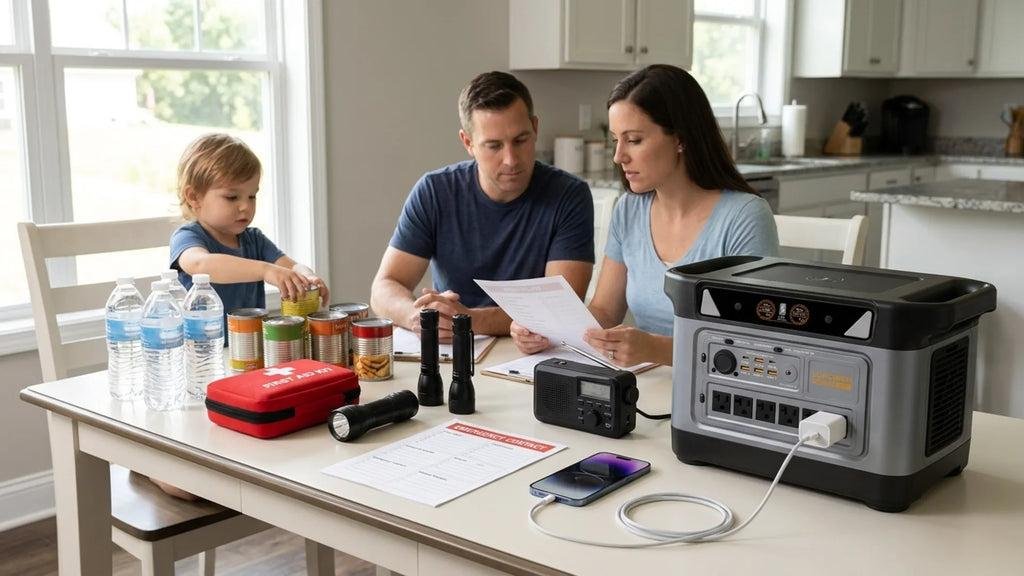
The standard guideline from Ready.gov is at least one gallon of water per person per day, for drinking and basic sanitation, with at least a several-day supply. Two weeks is better. Don’t forget pets, and plan for more if it’s hot or someone is pregnant, nursing or ill.
- Store commercially bottled water, or fill clean food-grade containers and replace the water every six months.
- Know where your home’s main water shutoff valve is, in case pipes burst.
- Your water heater holds a tank’s worth of usable water in a pinch (learn how to drain it safely before you need to).
- Have a way to treat questionable water: a quality filter, plus unscented household bleach and the official instructions for disinfecting water.
- When a boil-water notice is issued, follow it exactly. Don’t guess.
Food: a pantry you’ll actually eat
Forget the image of a bunker full of mystery cans. The best emergency pantry is just a deeper version of your regular pantry: foods your family already eats, that don’t need refrigeration and that require little or no cooking.
- Canned meats, fish, beans, soups, vegetables and fruit
- Peanut butter, nuts, crackers, granola and protein bars
- Rice, pasta, oats and instant potatoes (if you have a way to cook)
- Shelf-stable milk, coffee and tea (morale matters)
- Comfort food. Seriously. A bag of chocolate during day three of a blackout is a mental health intervention.
- A manual can opener. Write that one down twice.
Use a “first in, first out” system: put new groceries behind older ones, and eat from the front. That way nothing quietly expires in the back of a closet.
📘 Recommended guides for food and stockpiling
Emergency Pantry Meals System: a digital guide focused on building an emergency pantry from regular grocery-store food and planning 7-, 14- and 30-day meals. It’s a good fit if the idea of “prepping” feels overwhelming and you just want a shopping list and a meal plan.
Amazing Stockpiling Challenge: a structured, step-by-step program for building up food, water, medicine and gear over time instead of in one expensive shopping trip.
The Lost Ways: a long-running bestseller about the self-reliance skills earlier generations used every day: food preservation, storage and making do without modern systems. Great reading for the “what did people do before all this tech?” crowd.
Power: from “phone flashlight” to real backup
If your household’s emergency lighting plan is currently “use the phone flashlight,” no judgment. That’s most of us. But your phone is also your radio, your map, your bank and your link to family, so let’s not burn its battery lighting the hallway.
- Light: LED lanterns and headlamps for every family member, plus plenty of spare batteries. Avoid candles when possible; they’re a leading cause of house fires during outages.
- Small power: charged power banks for phones, plus a car charger.
- Medium power: a portable power station (a big rechargeable battery with outlets) can run a CPAP machine, keep phones and laptops alive, power a fan or run a small fridge for a while. Pair it with folding solar panels and you can recharge during the day.
- Large power: a generator can run a refrigerator, freezer, sump pump and more. If you go this route, learn the safety rules cold: never run a generator indoors, in a garage, or near windows and doors. Carbon monoxide poisoning kills people every year after storms. Install battery-powered CO detectors.
🛒 Backup power and light
- Portable power station (solar generator): quiet and safe to use indoors because it doesn’t burn fuel. Jackery, EcoFlow and Anker SOLIX are popular brands. Match the capacity (watt-hours) to what you need to run.
- Folding solar panels: recharge your power station without gas. Check that the connector matches your unit.
- Dual-fuel inverter generator: runs on gasoline or propane and is safer for electronics. Outdoor use only.
- Battery-powered carbon monoxide detectors: non-negotiable if you own a generator or fuel-burning heater.
- Rechargeable LED lanterns and headlamps: hands-free light for cooking, caring for kids and checking on pets.
Cooking without the grid
A camp stove (propane or butane) used outdoors or in a well-ventilated space as the manufacturer directs lets you heat food and boil water. A charcoal or propane grill works too, but only outside, never in a garage or on an enclosed porch. Keep extra fuel stored safely away from the house.
Heating and cooling
Winter outage? Pick one room to keep warm, close off the rest, hang blankets over windows and doorways, and layer up. Have warm sleeping bags and wool blankets. Summer outage? Stay hydrated, keep blinds closed during the day, use battery fans, and know where your local cooling centers are. Check on elderly neighbors in both cases; temperature extremes are where outages turn dangerous.
Sanitation
Nobody likes to talk about it, but if water pressure drops, toilets become a problem fast. Keep heavy-duty trash bags, a five-gallon bucket with a lid, kitty litter or sawdust, hand sanitizer, wet wipes and disinfectant on hand. You’ll be the hero of your street.
Medicine and first aid
- Talk to your doctor and pharmacist about keeping a small reserve of essential prescriptions. Many insurance plans allow early refills or 90-day supplies.
- Keep a printed medication list in your life binder.
- If someone relies on refrigerated medication or powered medical equipment, plan backup power specifically for that, and register with your utility’s medical priority program if one exists.
- Build a real first aid kit and learn how to use it. A basic first aid and CPR class is one of the best preparedness investments there is.
📘 Recommended for home medical readiness
The Home Doctor: a large, illustrated home reference for handling common injuries and illnesses when you can’t get to a clinic right away. It’s a reference to keep on the shelf, not a substitute for real medical care. When emergency services are available, call them.
Comprehensive family first aid kit: a good starting point; add your family’s specific medications and supplies.
Fuel and transportation
- Adopt the half-tank rule: never let your vehicle drop below half a tank. When pumps go down, you’ll have enough to get where you need to go.
- Know how to manually open your garage door. Find the red cord on the opener today.
- Keep a basic car kit: water, snacks, blanket, flashlight, jumper cables, a phone charger and that paper map.
The Outdoorbuild angle: give your preps a proper home
Here’s where I get to talk about my favorite subject. (You knew this was coming. It’s in the name of the website.)
One of the biggest reasons families don’t keep emergency supplies is simple: there’s nowhere to put them. The pantry is full, the hall closet is full, and the garage is a museum of unfinished projects. So the water ends up stacked by the back door, the generator lives under a tarp, and the gas cans sit next to the water heater (please don’t do that).
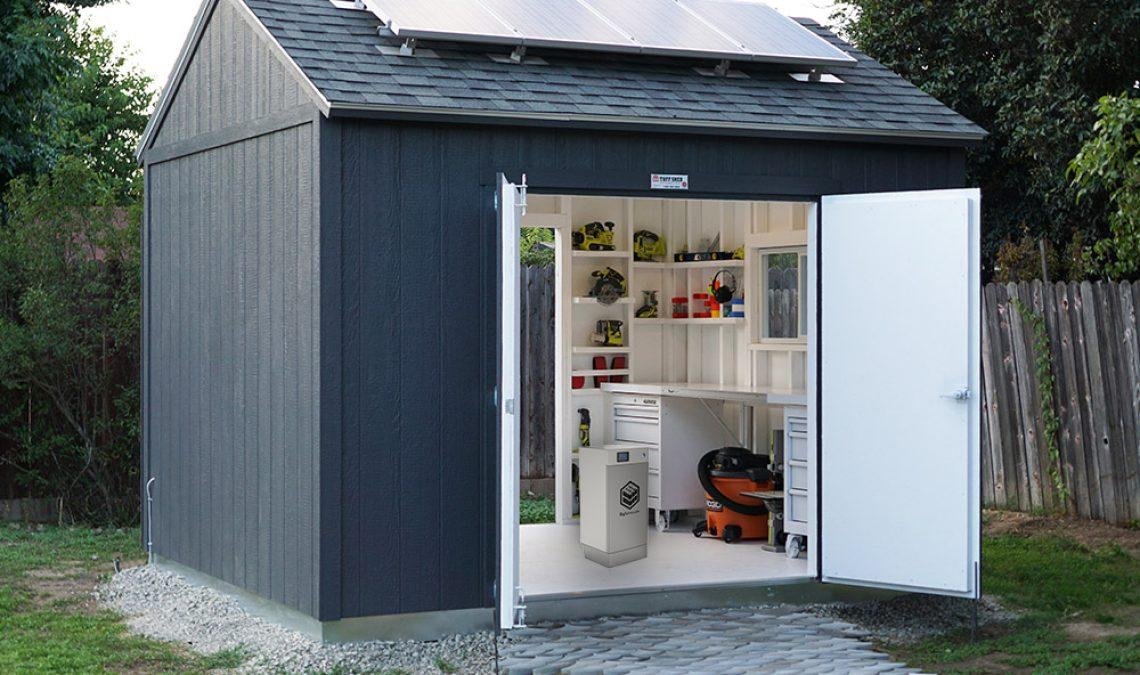
A well-built backyard storage shed solves a lot of that. It gives you a dry, organized, ventilated place to store fuel safely away from the house, keep a generator ready to roll out, stack water and bulk supplies on sturdy shelves, and hang your tools where you can actually find them in the dark. Add a small solar panel and a battery, and your shed becomes a mini power hub. Inside the house, a simple set of DIY pantry shelves can turn a cramped closet into a properly rotated food storage system.
🔨 Build your preparedness storage
MyShedPlans: a huge library of shed designs with materials lists and step-by-step instructions, from small lean-tos for fuel and generator storage to full-size workshop sheds. If you want a dedicated “preparedness shed,” this is where I’d start.
Ted’s Woodworking: thousands of woodworking plans, including shelving, storage racks, cabinets and workbenches. Perfect for building heavy-duty pantry shelves, water storage racks and a rotation system that actually works.
How Do You Build a Family Contact Plan That Doesn’t Need a Signal?
The scariest part of any big outage isn’t the dark. It’s not knowing where your people are. Kids are at school, someone’s at work across town, a parent lives alone an hour away, and suddenly nobody’s phone connects.
Here’s how to build a plan that works even when the network doesn’t:
- Pick an out-of-area contact. Choose a relative or friend who lives in another region. During local emergencies, long-distance calls and texts often get through when local ones don’t. Everyone in the family checks in with that person, who relays updates.
- Choose two meeting places: one right outside your home (for emergencies like a fire) and one outside your neighborhood (in case you can’t get home). Pick a specific, easy-to-find spot, like the front entrance of a particular library or church.
- Set a “default plan.” Agree on what everyone does automatically if they can’t reach anyone. For example: “If the phones are down and you can’t reach anyone, go home. If you can’t get home, go to the meeting place and wait until 6 p.m., then check every two hours.” A default plan means nobody has to make decisions while panicking.
- Know your kids’ school emergency procedures, including where they’d be taken and who’s authorized to pick them up. Make sure the school has updated contacts.
- Text, don’t call. Texts use less network capacity and can go through on weak signals. Keep messages short.
- Write it all down. Put a wallet card in every family member’s wallet or backpack with key numbers, the out-of-area contact and the meeting places. FEMA’s Ready.gov offers a free family emergency plan template you can print.
- Consider two-way radios. For families who live close together, or neighborhoods that want to coordinate, two-way radios work with no cell network at all. Basic FRS radios need no license; more powerful GMRS radios require an FCC license (it’s inexpensive and covers your whole family).
- Practice once. Run a drill. Make it a game with the kids. It’s amazing how many holes a ten-minute practice run reveals.
🛒 Communication without a cell signal
- GMRS two-way radios: longer range for families and neighbors. Remember the FCC license.
- FRS walkie-talkies: license-free, kid-friendly and great for keeping track of family members nearby.
- Rechargeable AA/AAA batteries with charger: keep radios and lights running (and charge them from your power station).
How Do You Avoid the Scams That Spike During Outages?
If you only take one section of this article to heart, make it this one. During and after a big disruption, the odds that a scammer contacts you go way up, and the odds that you’re stressed, distracted and willing to act fast go up too. That’s exactly the combination they count on.
Within hours of the November 13 ground stop, travelers were understandably desperate to rebook flights, get refunds and find hotels. That’s prime hunting ground. Here are the scams to watch for during any major outage:
Common outage scams
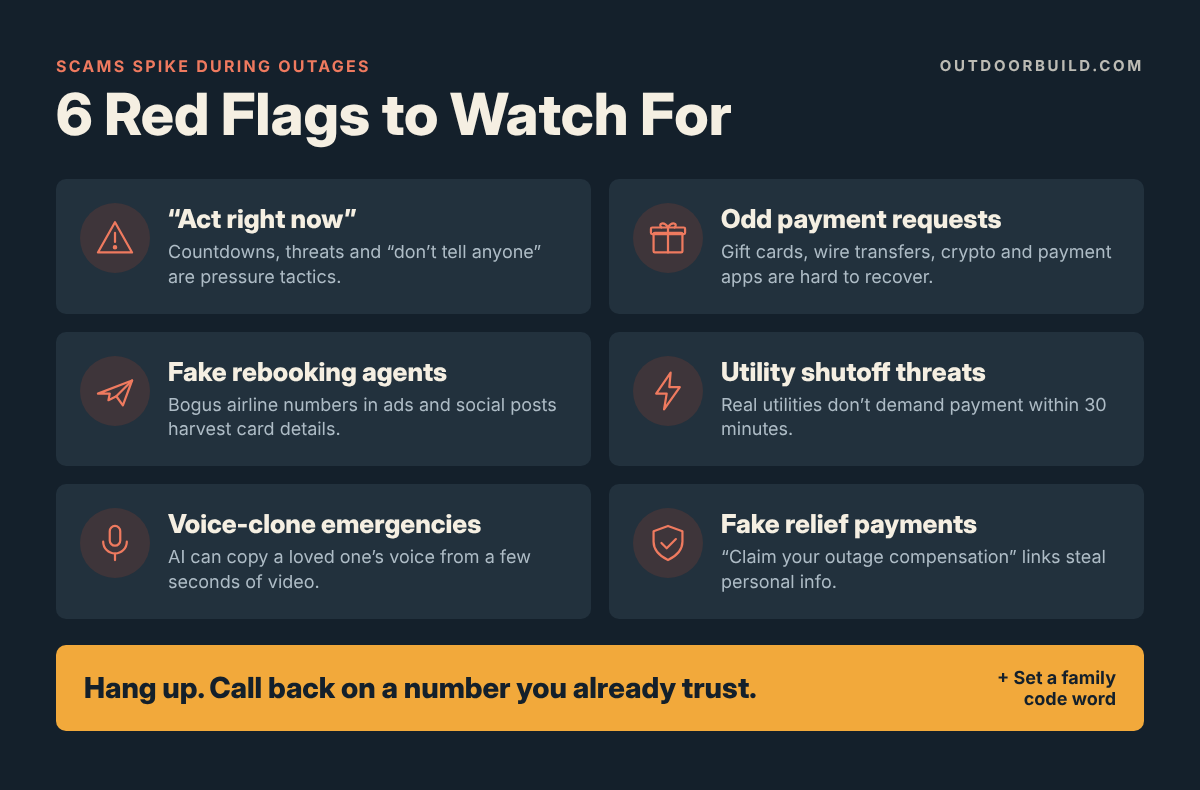
- Fake airline or travel “rebooking” agents. Scammers buy search ads or post fake customer-service numbers on social media. When you call, they “rebook” you and take your card number. Only use the phone number or app on your airline’s official website or your ticket confirmation.
- Utility shutoff threats. “Your power will be disconnected in 30 minutes unless you pay now with a gift card or payment app.” Real utilities don’t do that.
- Fake bank fraud alerts. A text or call says your account was “compromised during the outage” and asks you to verify your login or move money to a “safe account.” Banks will never ask you to move money to protect it.
- AI voice-clone emergencies. You get a call from a loved one’s voice (cloned from social media clips) saying they’re stranded and need money wired immediately.
- Fake relief and refund programs. “Claim your FEMA payment” or “Claim your outage compensation” links that harvest personal information.
- Fake charities that pop up after any widely covered event.
- Price gougers and fly-by-night contractors offering generator installs, tree removal or repairs, demanding cash up front.
Your anti-scam rules (decide them now)
- Never act on an incoming message. If someone contacts you, hang up or close the message, then contact the organization yourself using a number you already trust (from your life binder, the back of your card or the official website).
- Urgency is a red flag. Anything that says “right now,” “in 30 minutes” or “don’t tell anyone” is almost certainly a scam.
- Weird payment methods are a red flag. Gift cards, wire transfers, cryptocurrency and payment apps are the scammer’s favorites because the money is nearly impossible to recover.
- Set a family code word. Pick a word that only your family knows. If someone calls claiming to be a family member in trouble, ask for it. A voice clone can copy how your kid sounds; it can’t guess your code word.
- Turn on multi-factor authentication for your email, banking and phone carrier accounts, and add a PIN or passcode to your mobile account to block SIM-swap fraud.
- Report scams to the FBI at IC3.gov and to the FTC at ReportFraud.ftc.gov. Your report helps warn others.
🛒 Lock down your accounts
- Hardware security keys (like YubiKey): the strongest form of two-factor login for email and financial accounts, and highly resistant to phishing.
- Faraday bags: signal-blocking pouches for key fobs and spare devices. Handy for blocking keyless-entry car theft, too.
- Cross-cut paper shredder: because your printed life binder deserves a safe retirement when you update it.
What Should You Do If Your Own Accounts Get Hacked?
Not every disruption is a citywide blackout. Sometimes the “system” that goes down is your own email, bank account, phone number or social media. With AI-written phishing getting harder to spot, this can happen to anyone. If it happens to you, work through this list in order:
- Secure your email first. Your email is the master key to everything else, because it’s where password resets go. Change the password from a device you trust, sign out all other sessions and turn on multi-factor authentication.
- Call your bank and card companies using the numbers on the back of your cards. Freeze or replace cards if needed and review recent transactions.
- Contact your mobile carrier if your phone suddenly loses service unexpectedly. That can be a sign of a SIM swap. Ask them to lock your account and add a port-out PIN.
- Change passwords on your important accounts, starting with financial ones. Use a unique password for each; a password manager makes this painless.
- Freeze your credit with all three bureaus (Equifax, Experian and TransUnion). It’s free and stops criminals from opening new accounts in your name.
- Warn your contacts if your email or social accounts were used to send messages, so they don’t fall for follow-up scams.
- Report it at IdentityTheft.gov (for identity theft) and IC3.gov (for cybercrime).
The One-Week Household Readiness Plan (30 to 60 Minutes a Day)
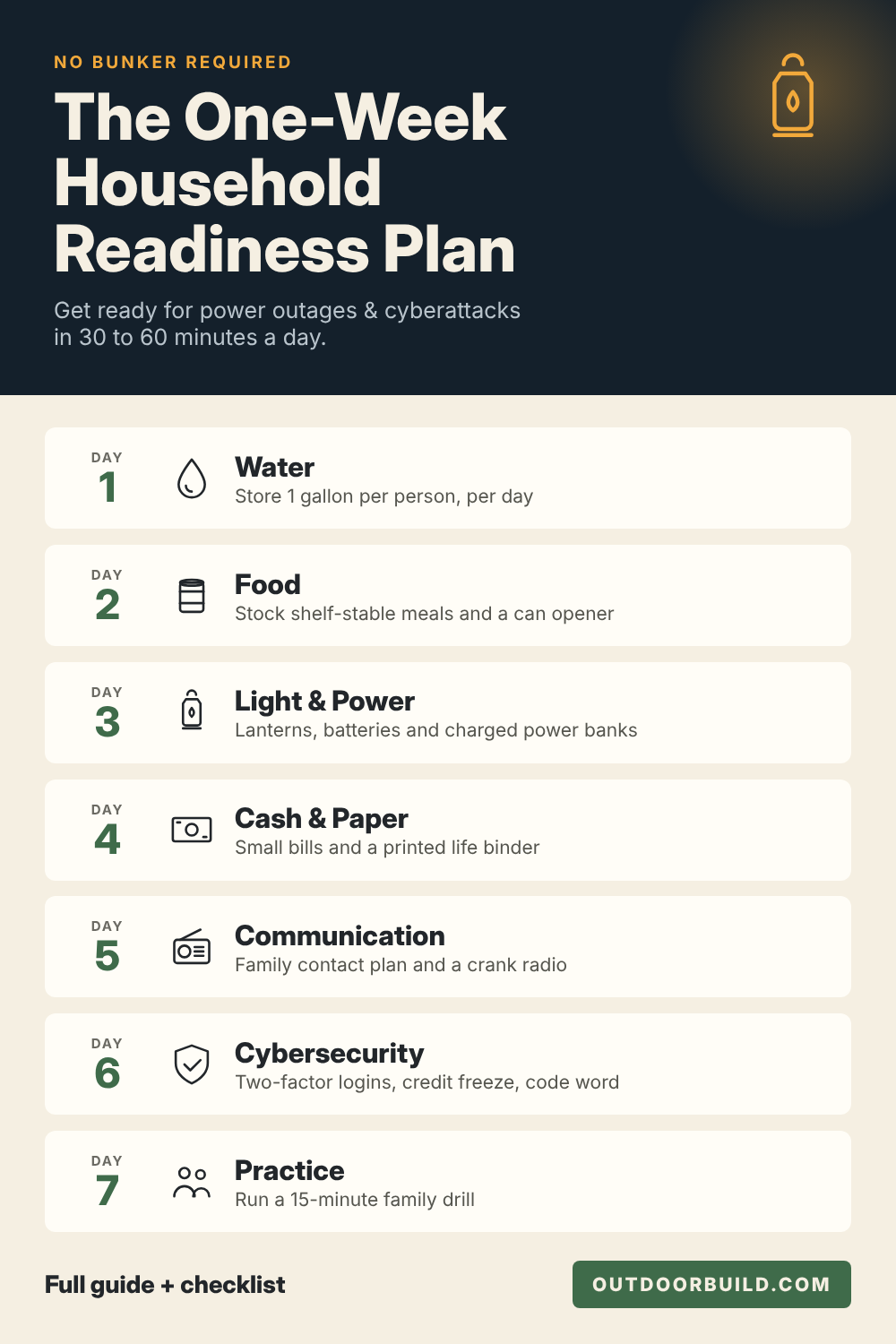
Reading about preparedness feels productive. Doing it is productive. Here’s a simple one-week plan that takes about 30 to 60 minutes a day. By next weekend, you’ll be ahead of the vast majority of households in America.
Day 1: Water. Buy or fill enough water for at least three days (one gallon per person per day), then start working toward two weeks. Find your home’s main water shutoff valve.
Day 2: Food. Take inventory of your pantry. Buy enough shelf-stable food your family actually likes for at least three days. Buy a manual can opener.
Day 3: Light and power. Get a lantern or headlamp for each person, spare batteries, and a charged power bank. Find the manual release on your garage door. Price out a power station if someone in the house depends on electricity for health.
Day 4: Cash and paper. Withdraw a small stash of cash in small bills. Start your life binder: phone numbers, prescriptions, insurance info and account phone numbers.
Day 5: Communication. Choose your out-of-area contact and two meeting places. Make wallet cards for everyone. Get a battery or crank radio.
Day 6: Cybersecurity. Turn on multi-factor authentication for email, banking and your mobile carrier. Set a family code word. Freeze your credit.
Day 7: Practice and plan the next step. Run a 15-minute family drill. Then pick your next upgrade: a bigger water supply, a storage shed, a generator, a first aid class or a two-week pantry.
That’s it. Seven days. No bunker required.
Recommended Resources at a Glance
Here’s everything mentioned in this guide in one place, so you can bookmark this page and come back to it.
| Need | Recommended resource | Why it helps |
| Pantry planning | Emergency Pantry Meals System | Grocery-store food turned into 7/14/30-day meal plans |
| Building supplies step by step | Amazing Stockpiling Challenge | A structured program instead of one overwhelming shopping trip |
| Old-school self-reliance skills | The Lost Ways | How people lived before modern systems existed |
| Home medical reference | The Home Doctor | Illustrated guidance for injuries and illness at home |
| Preparedness storage shed | MyShedPlans | Shed designs for safe fuel, generator and supply storage |
| Pantry shelves and storage racks | Ted’s Woodworking | Plans for shelving, racks and cabinets |
| Emergency news | Hand-crank NOAA radio | Official alerts with no internet or power |
| Backup power | Portable power station + solar panels | Quiet, indoor-safe power for phones, medical devices and lights |
| Off-grid communication | GMRS two-way radios | Family contact with no cell network |
| Document protection | Fireproof document bag | Protects your life binder and cash |
| Account security | Hardware security key | Phishing-resistant login protection |
Frequently Asked Questions
Can a cyberattack knock out power or water to my home?
It’s possible, though most outages are still caused by weather, equipment failures and human error. U.S. agencies have warned that foreign government hackers have positioned themselves inside energy, water and communications networks, and attacks on small water utilities have already happened. Because you can’t predict the cause, the smart move is to prepare for the effect: water, food, light, cash, a radio and a family contact plan.
How long should my household be prepared to go without power or services?
Ready.gov recommends supplies for at least several days, and many emergency managers suggest preparing for up to two weeks. A practical target is to be comfortable for three days and able to manage for fourteen.
How much water should I store for an emergency?
Store at least one gallon of water per person per day for drinking and sanitation, plus extra for pets, hot weather and anyone who is ill, pregnant or nursing.
How much cash should I keep at home for an outage?
There’s no single right number, but a common starting point is enough cash in small bills to cover a few days to a week of essentials like food, fuel and medicine. Store it securely in a fire-resistant safe or bag.
Is AI really making cyberattacks on infrastructure easier?
Yes, mainly by lowering the skill required. In 2026, the security firm Dragos documented attackers using commercial AI tools to help target a water utility in Mexico. The attack ultimately failed to reach the utility’s operational systems, but researchers warned that AI compresses expert-level work into hours. The FBI also logged about $893 million in AI-related cybercrime losses in 2025.
How can my family communicate if cell networks go down?
Use an out-of-area contact, pre-agreed meeting places and a default plan that everyone follows automatically. Texts often go through when calls fail. For short distances, FRS or GMRS two-way radios work with no cell network at all.
What’s the most common scam during an outage?
Impersonation scams, such as fake airline rebooking agents, fake utility shutoff calls and fake bank fraud alerts, are among the most common. The best defense is never acting on an incoming message. Instead, contact the company yourself using a number you already trust.
The Bottom Line: Prepared Beats Scared
Friday’s ground stop was a wake-up call, but not the kind that should send you into a panic. Planes landed safely. The system came back. Airlines are working through the backlog. That’s what resilience looks like at a national scale.
Your job is to build the same thing at the household scale. Not because the world is ending, but because systems fail, sometimes because they’re old, sometimes because someone pushed a bad update, and sometimes because someone wanted them to. When that happens, the households that do best aren’t the ones with the most gear. They’re the ones with a plan, a few backups and the calm that comes from knowing they’ve already handled the basics.
Water. Food. Light. Cash. Paper. A radio. A family plan. A healthy suspicion of anyone who calls you with an “urgent” problem.
Start with Day 1 this weekend. Future you (sitting comfortably by a lantern, eating chocolate, listening to the radio while the neighbors try to figure out how to open their garage door) will be very grateful.
Stay safe, stay prepared, and as always, build something good.